


Piano Pop
4.316.00 Reviews
App Specs
- Version
- 2.00.00
- Updated On
- License
- Free
- Downloads
- 50,000+
- Developer
- MWM - AI Music and Creative Apps
- Categories
- Music
- Platform
- Android
Screenshots
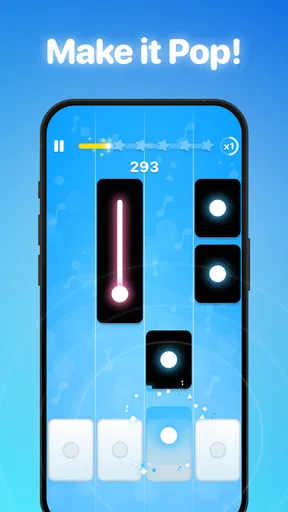
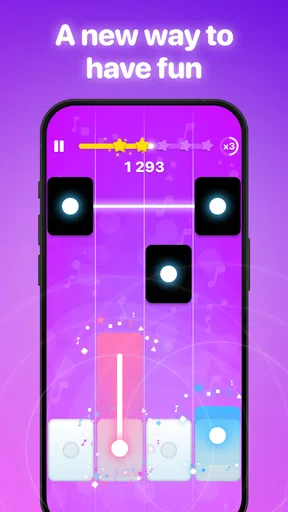
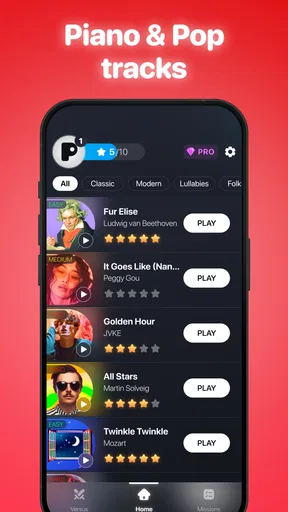
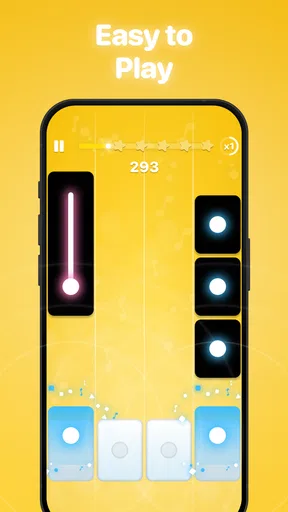
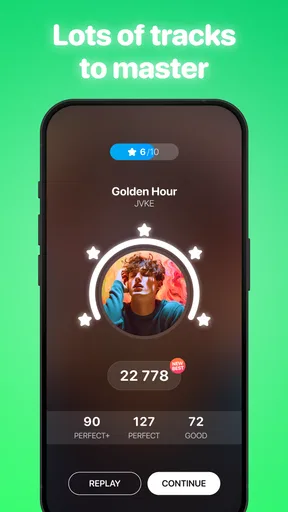
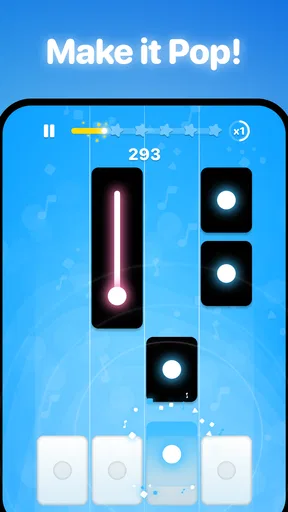
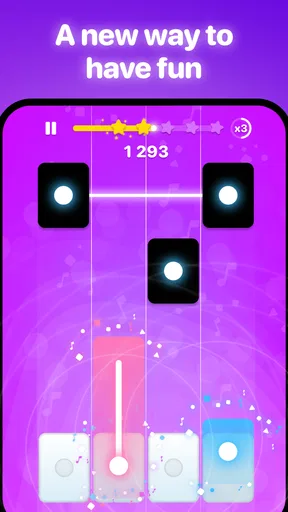
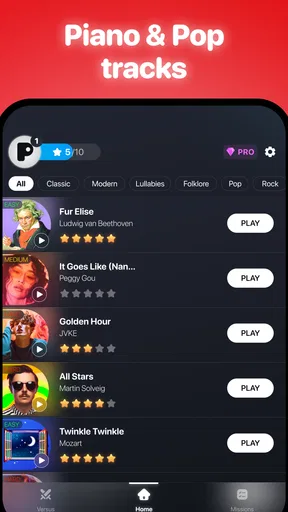
 Analysis by AppCompare
I like the idea of a piano game that makes a quick musical break feel inviting rather than turning it into homework. Piano Pop is a music game from MWM - AI Music and Creative Apps, and its appeal is easy to understand: it puts piano-themed play on a phone and keeps the barrier to trying it low. I’d approach it as a casual way to enjoy music, not as a substitute for structured piano instruction.
What the free option means in practice
The game is free to download, which makes it straightforward to try before deciding whether it fits your routine. It also offers in-app purchases priced from $3.99 to $44.99 per item, so “free” describes access to the download, not necessarily every purchase a player might encounter. I’d start without spending and see whether the available experience is satisfying before considering any paid option.
That distinction matters if you are choosing between a quick phone game and a paid learning tool. Piano Pop’s free entry point suits a curious player who wants to see whether this kind of music game is enjoyable; the listed purchase range is broad enough that I would check what an item includes before buying. A higher price does not automatically make sense for someone who only wants occasional play.
Where the value comes from
The main value here is convenience and a music-focused diversion. I can imagine opening it during a short break, or letting a child explore a music game at home, rather than setting aside time and space for a keyboard lesson. Its Everyone age rating makes it suitable for a broad audience, though parents should still make their own decisions about in-app purchases and device use.
It has a modest but real audience: Piano Pop has a 4.4 average from around 200 ratings and more than 10,000 installs. I read that as a sign that people are finding and rating it, not as proof that it will suit every player. Ratings can help with a first impression, but your own test of the controls, pace, and purchase prompts is more useful.
How the game fits into a music routine
For me, the best way to judge a mobile music game is to ask what I want from it. If I want a light, self-contained activity with a piano theme, this is a more natural fit than a full digital audio workstation or a lesson app built around instrument technique. If I want to learn accurate fingering, read notation in depth, or practise on a real keyboard, I would choose a dedicated teaching resource instead.
Small habits that make a trial more useful
I’d try it in a quiet moment with the phone held comfortably, rather than treating the first few minutes as a serious test of musical ability. A short session helps reveal whether the timing and touch feel enjoyable on your particular device. If the game feels awkward on a small screen, changing how you hold the phone may help, but it cannot turn a touchscreen into piano keys.
Worth Reading Before You Choose

EA SPORTS FC Mobile 26 Is a Bigger Football Game, but It Takes Time

Flipboard Shows What News Apps Must Do Beyond the Feed

Switching to Android Auto Means Rethinking Your Driving Routine

Google Calendar Makes a Crowded Week Easier to Manage

Ludo King Makes the Most of the Minutes Between Plans

Baby Panda World Brings Quick Play to Modern Phones, but Its Game Library Feels Busy
Another useful approach is to decide in advance what you want from each session: a brief distraction, a rhythm challenge, or a reason to return to music during a busy day. That keeps expectations realistic. A mobile game can make musical play more accessible, but it should not be judged by the same standards as a piano teacher or a full-sized instrument.
Trade-offs compared with other music apps
Compared with music-learning apps that focus on lessons, Piano Pop is best considered as a game first. A structured course is the better choice when progress depends on technique, feedback about posture, or a planned sequence of skills. A general rhythm game may be a better fit if you care more about broad beat-based play than a piano identity. The right choice depends on whether you want playful piano interaction or systematic musical training.
The phone format is both its convenience and its limitation. You can play without bringing an instrument along, but tapping a screen does not provide the feel, range, or physical feedback of piano keys. I would not use it to decide whether I am ready to perform a piece on an acoustic or digital piano. I would use it to see whether a few minutes of music-based play fits into my day.
Who is likely to enjoy it—and who may not
I’d recommend giving it a try if you enjoy casual games, like piano-themed experiences, and want something approachable to open during spare moments. It may also work as a low-commitment introduction for someone who is curious about music but not ready to sign up for lessons. Since it is free to download, you can form your own view before paying for anything.
I’d skip it if your main goal is to develop dependable piano technique, learn music theory in depth, or practise on a physical keyboard. It is also less compelling if you dislike touchscreen controls or prefer games that do not offer optional purchases. In those cases, a traditional piano-learning app, a keyboard and course, or a different kind of music game will likely serve you better.
A realistic use case is a short break between tasks: I would open the game, play for a few minutes, and then put it away without expecting that session to count as a formal lesson. If the experience is fun, it can make music feel easy to revisit. If I find myself wanting more precise instruction, that is a helpful signal to move on to a tool designed for learning rather than trying to make a casual game do every job.
What to check before spending
The current version is 1.29.00, and the stated minimum operating-system requirement is version 7.0. Before downloading, I’d check that my device meets that requirement and that I have enough comfort using a phone as the main playing surface. The game is free, but any purchase should be considered separately: I would read the in-app purchase details in context and only pay for something I understand and actually want.
If a child will be playing, I would also talk through purchases before handing over the device. An Everyone rating describes the broad content age category; it does not mean that every buying decision is automatically suitable for every family. Keeping purchase approval with an adult makes the free-to-try model easier to manage.
Getting Started with Piano Pop
When I first downloaded Piano Pop, I was a bit skeptical. I mean, how much can an app really teach you about playing the piano? But from the moment I opened it, I was pleasantly surprised by its user-friendly interface. You don’t need to be a tech wizard to navigate through this app. It’s as simple as tapping your way into a musical journey.
The setup process is quick and painless. You just need to create an account, select your skill level, and you’re good to go. Whether you’re a complete beginner or someone looking to brush up on your skills, the app tailors its lessons to suit your needs. I was impressed by how it seamlessly adapts to your pace, making learning super chill.
Features that Hit the Right Notes
One of the coolest features of Piano Pop is its song library. We're talking hundreds of tunes across various genres. Whether you’re into classical, jazz, or the latest pop hits, there’s something for everyone. The app provides sheet music and step-by-step tutorials to get you playing your favorite songs in no time.
Another feature that I found incredibly helpful is the interactive lessons. The app provides real-time feedback, which means you can instantly correct your mistakes. It's like having a personal coach who’s always there to guide you. Plus, the lessons are bite-sized, making it easy to fit into a busy schedule.
And let’s not forget about the practice mode. This feature allows you to slow down the tempo of any song, making it easier to learn those tricky parts. You can gradually increase the speed as you get more comfortable, which is a total confidence booster.
Why You’ll Love This App
What really sets Piano Pop apart is its gamified learning approach. The app turns practice into a fun and engaging experience by incorporating challenges and rewards. You earn points and badges as you progress, which keeps you motivated to practice more. It’s the little things like these that make learning feel less like a chore and more like a game.
Additionally, the social aspect of Piano Pop is a nice touch. You can connect with friends, share your progress, and even collaborate on songs. It adds a community feel to the app, which is pretty cool, especially if you love sharing your musical journey with others.
Wrapping It Up
All in all, Piano Pop has exceeded my expectations. It’s packed with features that make learning the piano accessible and enjoyable for everyone. Whether you’re just starting out or looking to refine your skills, this app has something to offer. The combination of a vast song library, interactive lessons, and gamified learning makes it a standout choice for anyone looking to dive into the world of music.
So if you're ready to embark on a musical adventure, give Piano Pop a try. It’s a fun, engaging, and effective way to learn the piano right from the comfort of your own home. Who knows? You might just discover a hidden talent you never knew you had!
My verdict on its value
I’d treat Piano Pop as an easy, low-commitment way to spend time with a piano-themed game, rather than paying for it in the hope that it will replace lessons or a keyboard. The free download makes trying it sensible; the in-app purchase range is a reason to pause and judge each option on its own merits. If the playful format is what you want, it is worth exploring. If measurable musical progress is the priority, I’d put that money and practice time toward a more focused learning option.
Pros
- User-friendly interface for beginners.
- Wide range of popular songs available.
- Interactive lessons enhance learning.
- Supports multi-touch for chord playing.
- Offline mode for playing anywhere.
Cons
- Limited song library in free version.
- In-app purchases can be costly.
- Ads can interrupt gameplay.
- Requires internet for some features.
- Occasional lag on older devices.
FAQs for Piano Pop
What is Piano Pop and how does it work?
Piano Pop is an engaging mobile game that combines the fun of playing a virtual piano with the challenge of rhythm-based gameplay. Users tap on the tiles as they scroll down the screen, playing popular tunes while improving their timing and hand-eye coordination. It's designed for all ages and skill levels, offering both a casual and challenging experience.
Is Piano Pop free to download and play?
Piano Pop is free to download on both Android and iOS devices. While the basic features and levels are accessible without charge, the game offers in-app purchases that allow users to unlock premium content, such as additional songs, themes, and ad-free gameplay. These are optional and enhance the overall experience.
What are the system requirements for Piano Pop?
To run Piano Pop smoothly, Android users need a device with at least Android 5.0, while iOS users require iOS 11.0 or later. The game is optimized for both smartphones and tablets, but for the best experience, a device with a larger screen and good processing power is recommended.
How does Piano Pop ensure user data privacy?
Piano Pop is committed to protecting user privacy. The app collects minimal data necessary for gameplay and improvements. It adheres to strict privacy policies and complies with GDPR and other data protection regulations. Users can review the privacy policy in the app settings for more detailed information on data handling practices.
Can I play Piano Pop offline?
Yes, Piano Pop offers offline play, allowing users to enjoy the game without an internet connection. However, certain features, like downloading new songs or accessing online leaderboards, require an internet connection. It's perfect for playing on the go, especially in areas with limited connectivity.


